


Attendo (formerly Petpooja Payroll) vs PagarBook: Pricing
Attendo runs attendance through to payroll on one flat annual fee, with the device in the box. PagarBook keeps things mobile-first and bills per employee, with its device sold separately. Which fits depends on how much your headcount moves.
The shift towards digital payroll systems has accelerated among Indian businesses over the past few years. As businesses move away from paper-based registers & spreadsheet-driven salary calculations, the demand for structured payroll software has grown steadily. Modern attendance and payroll software now plays a central role in ensuring transparency, compliance, and workforce accountability.
Among the many payroll software companies in India, businesses often search for the best payroll software for small businesses in India that balances cost, compliance, and attendance accuracy, especially when comparing fixed subscriptions with per-employee pricing models. Whether implemented as a structured salary management system or as part of a broader HRMS for small businesses, payroll software must align with operational realities. Attendo and PagarBook are two such solutions businesses weigh up.
What Are the Key Differences Between Attendo and PagarBook?
While both platforms serve as payroll software for Indian businesses, their approach to attendance control, pricing and system functionality varies. A closer look at these differences clarifies which solution may be better suited to your business needs.
Attendo
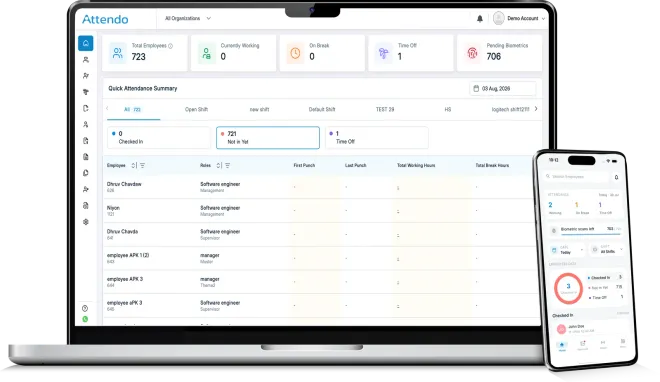
Attendo is a complete workforce management system for every kind of business, running attendance, shifts, leaves, approvals, payroll and statutory compliance in one place. It is built by Petpooja, which has been serving Indian businesses since 2011, and more than 40,000 businesses run on it today across manufacturing, corporate offices, retail, healthcare, hospitality and education.
Key Features
- Centralised attendance‑linked payroll processing across multi‑outlet teams
- Punches captured on the attendance device, the Face Scan App or the Employee App, syncing to the cloud in under 2 seconds
- Automatic PF, ESIC, PT, TDS and LWF calculations with compliance reporting
- Multi-location attendance consolidated into one dashboard, across unlimited branches and departments
- Overtime with configurable buffers, fixed break hours, and geo-fenced mobile punches
Best For
Indian businesses of any size that want a price-effective way to run attendance and payroll. It fits particularly well where:
- payroll reconciliation requires central consolidation,
- attendance data comes from different outlets or work sites,
- supervisors need a unified payroll view across teams.
This makes Attendo well‑suited for businesses operating:
- retail or franchise chains,
- field staff or service delivery teams,
- distributed outlets where attendance handling is fragmented.
The same setup runs across very different floors, from a fabrication unit in Rajkot on two shifts, a diagnostic lab chain in Pune, a garment showroom in Surat. Our guide to what Attendo includes covers the modules in detail.
Pagarbook
Simple, mobile-first payroll built for small teams.
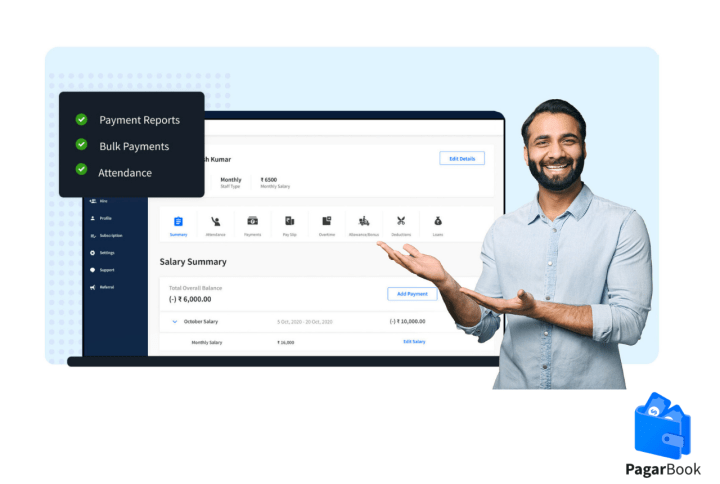
PagarBook focuses on ease of use and quick setup. It is designed for small businesses that need straightforward attendance tracking and salary calculation without complex configurations.
It keeps payroll lightweight and accessible.
Key strengths:
- Very easy onboarding and setup
- Mobile-based attendance tracking
- Payroll with PF and ESI, bulk payments and dashboards on the desktop app
- Suitable for non-technical users
Best for: Micro and small businesses seeking simplicity over structure.
Pricing Comparison: Fixed Subscription vs Per-Employee Model
Pricing structure matters a great deal when selecting payroll management software. While both Attendo and PagarBook operate within the payroll software space, their cost models differ sharply, affecting how the payroll software price in India scales as your team grows.
For businesses using payroll as a core salary management system, pricing predictability becomes especially important when workforce size fluctuates.
| Criteria | Attendo | PagarBook |
| Pricing model | Flat annual subscription, no per-employee charge | Per-employee, billed annually |
| Cost behaviour as the team grows | Stays fixed | Increases with each employee added |
| Adding employees mid-year | No cost change | Additional per-employee charge |
| Statutory compliance | PF, ESIC, PT, TDS and LWF | PF and ESI listed |
| Attendance hardware | Device included in the package, lifetime warranty, on-site installation | Device sold separately (iD 8.0) |
| Support | 24×7×365, including salary-processing days | Monday to Sunday, 8am to 8pm |
For Attendo, the package and the device are worked out on a call. Talk to the Attendo team about which one suits the site. PagarBook’s rates change too, so check the current numbers on their own site (linked above) rather than relying on a figure quoted in an article.
How Does Payroll Cost Behave as Your Business Grows?
Pricing alone does not determine the right payroll software. What matters more is how that pricing behaves as your team expands. India’s payroll services market was worth USD 1.78 billion in 2025 and is forecast to reach USD 2.74 billion by 2031 (Mordor Intelligence), so more businesses are buying into these systems every year.
For businesses planning to hire seasonal staff, expand to new outlets, or increase workforce size over time, per-employee pricing models can lead to incremental cost increases each year. While manageable for smaller teams, this structure may require recurring budget adjustments as the organisation grows.
In contrast, a fixed annual subscription model offers cost predictability. Once subscribed, adding employees does not change the overall payroll software price in India for that year. For businesses treating payroll as a long-term salary management system rather than a short-term tool, this predictability can reduce budgeting pressure.
The right choice depends on your growth plans:
- Stable team size with minimal expansion → Per-employee pricing may remain manageable.
- Growing workforce or multi-location expansion → Fixed pricing offers long-term cost clarity.
5 Practical Points to Evaluate Before Choosing Payroll Software
1. Attendance Dependency
- If your salaries depend heavily on:
- Shifts
- Overtime
- Late penalties
- Multiple punch-ins
- Then attendance-linked payroll becomes critical. If attendance rules are simple, lightweight payroll may work.
2. Workforce Growth Plan
- Are you planning to:
- Hire seasonal staff?
- Expand to new locations?
- Increase workforce size in the next 12-18 months?
- If yes, evaluate how pricing behaves as headcount increases.
3. Compliance Exposure
- Businesses under PF/ESI scrutiny or regular audits may require:
- Automated statutory calculations
- Structured reporting
- Compliance-ready documentation
- Simpler setups may not require advanced automation.
4. Operational Complexity
- Ask yourself:
- Is payroll handled centrally?
- Do managers manually share attendance?
- Are corrections frequent at month-end?
- The more manual coordination involved, the more structured the system needs to be.
5. Budget Predictability
- Does your business prefer:
- Variable cost per employee? Or
- Fixed yearly budgeting?
- This often determines long-term comfort.
Conclusion
Attendo and PagarBook are built around different bets. Attendo is a complete workforce management system on a flat annual fee, with the attendance device included and supported by the same company, which is what keeps the cost predictable as headcount moves. PagarBook keeps things light and mobile-first, and sells its device separately.
If your salaries depend on shifts, overtime and multi-site attendance, and you would rather budget once a year than recalculate every time you hire, Attendo is the more practical fit. If the team is small and attendance is simple, a lighter tool may be all you need. Want to see it on your own roster? See how Attendo works end to end.
Frequently Asked Questions
1. What factors should a business consider before choosing payroll software?
2. Does payroll software handle PF and ESI compliance?
3. When should a business choose mobile-first payroll apps over structured payroll systems?
4. Is fixed pricing better than per-employee payroll software pricing?
5. How secure is cloud payroll software?
Related Articles You May Like
What a Day of Leave Without Pay Actually Costs
Leave without pay does more than dock a day’s salary. It reaches your provident fund, your ESI, the service behind a gratuity payment and the balance you build for the year ahead.
Ashwiniba Vaghela
HR & Payroll Experts
How to Complete the ESI Registration Process in 8 Steps
Registration is online, real time, and needs no paper at all. The state that wants 20 workers where its neighbour wants 10, what the C-11 letter proves, and why the amnesty no longer helps.
Ashwiniba Vaghela
HR & Payroll Experts
Expected CTC: 7 Ready-to-Use Answers for Your Next Interview
The question asks what you would cost, not what you would receive. Seven lines to use in an interview, the reasoning that backs each of them, and why the law measures a different figure from the one in an offer.
Avani Joshi
HR & Payroll Experts
How the ESIC Claim Process Works for Employees
One form per benefit, one office, and a three-day rule on medical certificates that quietly costs people money. What each claim pays, and how fast ESIC has to pay it.
Avani Joshi
HR & Payroll Experts