

6 Zoho People Alternatives I’d Pick for Payroll in 2026
Zoho People’s prices from India, and six HR tools that keep attendance, leave and payroll in one product.
Listen to this article
Zoho People runs HR well, but salary sits in a separate app, Zoho Payroll. If you want attendance, leave and pay in one place, that second app is the main reason to look around.
Attendo (formerly Petpooja Payroll) closes that gap. Having compared all six, I rate it the best Zoho People alternative for any Indian business that wants attendance and payroll in one system, without a separate attendance vendor or per-employee pricing.
Attendo is a complete workforce management system for every kind of business. The other five, HROne, sumHR, Qandle, Kredily and Pocket HRMS, each keep payroll in the same product.
Key Takeaways
- Attendo leads this list of six, because punches, time off and salary sit in one system, with the machine included.
- Zoho People’s yearly plans run from ₹48 to ₹192 per user a month, before tax.
- One product means one setup, because a late mark reaches the payslip without a second app.
- If staff punch in at a gate, check who supplies the machine first.
Why Look for Zoho People Alternatives?
Zoho People is well rated, so the reasons to move are about fit. Its plans are listed further down; these reasons come from its pricing page and its users on G2:
- Payroll is a separate product. Salary runs in Zoho Payroll, connected to Zoho People, not inside it.
- Billing is per user. Every new hire adds to the yearly bill.
- Attendance needs a higher plan. Attendance and rosters start on the Professional plan.
- Customisation and set-up come up in reviews. In Zoho People’s G2 reviews, the cons users tag most are limited customisation (19), learning curve (17) and not user-friendly (16).
Its G2 rating is still 4.5, so these matter most if you want payroll and attendance in one product.
6 Zoho People Alternatives Compared
Every tool below gets the same treatment: what its own website says (checked October 2026), its G2 or Google Play rating, then pros, cons and my view. I weighed payroll, hardware, pricing and who each tool suits.
1. Attendo
Attendo is where I would start if any Indian business wants payroll to live with attendance. It keeps attendance, leave and payroll in one product, with shifts and approvals alongside.

- Payroll: PF, ESI, PT, TDS and LWF in the same product, with monthly, daily, weekly and hourly pay.
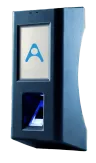
- Hardware: pick the Biometric, Biometric Pro or Face Scanner; on-site installation and a 1-year warranty come with it.
- Pricing: the software fee is yearly and does not change with headcount.
- Best for: businesses with front-line staff, from hospitals and clinics to factories.

Pros
- No per-employee charges: one flat yearly fee, whatever your headcount.
- An attendance device in every package, installed on site with a 1-year warranty.
- Device, software and support from one company.
- Punches can start the same day the device is installed.
- Support 24×7×365, including salary-processing days.
- Employee App in 11 Indian languages.
Cons
- A relatively new brand name, though Attendo is built by Petpooja, whose products 1,50,000+ businesses use and which has served Indian businesses since 2011.
My take: If you want attendance, leave and pay in one product, this is where I would start, because there is no second app to connect or reconcile.
2. HROne
HROne keeps HR and payroll in one product and works with the major biometric brands.

- Pricing: the HROne pricing page lists Basic at ₹4,950 a month and Professional at ₹6,500 a month, each for 50 users, with a charge for each extra user. Enterprise is custom.
- Statutory payroll: PF with ECR, ESI, PT, LWF, TDS, Form 24Q and Form 16.
- Attendance: biometric, face, selfie with geo-tag, GPS and geo-fencing; it names ESSL, ZKTeco, Suprema and BIOMAX devices.
- Best for: teams that want payroll inside their HR tool.

Pros
- Works with major biometric brands you may already own.
- Biometric integration on every plan.
- Wide statutory payroll, including LWF and Form 24Q.
Cons
- Recruitment and performance are on the Enterprise plan.
- Every extra user above 50 adds a monthly charge.
- Its pricing page shows more than one extra-user rate, so confirm yours.
My take: HROne keeps payroll in the same product, which is the gap Zoho People leaves. I would check the extra-user rate with them before comparing.
3. sumHR
For HR and payroll in one low-cost product, sumHR charges per user, with a free option tied to Jupiter salary accounts.

- Pricing: the sumHR pricing page lists Startup at ₹49, Basic at ₹69 and Advanced at ₹119 per user a month, billed annually. It also offers a free plan with Jupiter salary accounts.
- Statutory payroll: generates PF, ESI, PT and TDS challans, and Form 16.
- Attendance: web, mobile and biometric clock-in, with GPS clock-in and geo-fencing as a paid add-on.
- Best for: small teams that want HR and payroll together at a low price.

Pros
- Low per-user prices, published on its site.
- A free plan for companies using Jupiter salary accounts.
- Works with existing biometric devices.
Cons
- Billed per user, so the bill rises with every hire.
- One-time setup and biometric integration fees, amounts not stated.
- GPS clock-in costs extra.
My take: sumHR is the low-cost way to get HR and payroll in one product. I would weigh its per-user billing against your hiring plans.
4. Qandle
Qandle covers core HR and payroll in one product, with face attendance on a phone or kiosk.

- Pricing: the Qandle pricing page lists Foundation, Regular, Plus and Premium, each for up to 50 employees plus a charge per extra employee. Foundation is ₹2,450 or ₹2,950 a month, depending on the billing option.
- Statutory payroll: PF, ESI and PT, TDS with Form 24Q, Form 16 and full and final settlement.
- Attendance: biometric integration, face recognition on a phone or kiosk, selfie and geo-fencing.
- Best for: teams that want HR, performance and payroll in one place.

Pros
- Published prices, with a per-employee rate above 50.
- Face recognition on a phone or kiosk, with no device needed.
- Full and final settlement listed.
Cons
- Minimum billing for 50 users.
- Shift planning and field tracking are paid add-ons.
- A one-time implementation fee; the amount is not stated.
My take: Qandle covers HR and payroll together, so you skip the second Zoho app. Its 50-user minimum suits teams of that size or bigger.
5. Kredily
Kredily gives small teams payroll on a free plan and syncs the biometric machine they already have.

- Pricing: the Kredily pricing page lists a Free Forever plan at ₹0 for unlimited employees, subject to an active usage policy, with PF, ESI, PT and TDS calculation. Paid plans start at ₹1,249 a month for up to 25 employees.
- Attendance: web clock-in, and its KredSync tool syncs existing fingerprint or card devices.
- Best for: small teams that want payroll without a per-user bill.

Pros
- A free plan with PF, ESI, PT and TDS calculation.
- Syncs fingerprint and card devices you already own.
- Low entry price on the paid plans.
Cons
- The free plan allows one attendance rule and one salary structure.
- Selfie and GPS attendance need its higher paid plan.
- Challans and Form 16 need a paid plan.
My take: For a small team that wants payroll without paying per user, Kredily’s free plan is the cheapest test. I would check its one-salary-structure limit first.
6. Pocket HRMS
Pocket HRMS puts payroll at the centre of an HR suite, with published plans.

- Pricing: the Pocket HRMS pricing page lists Standard at ₹2,995 and Professional at ₹4,495 a month, billed annually, each for 50 employees, plus ₹60 or ₹90 per extra employee.
- Statutory payroll: PF, ESI, TDS, PT and LWF, with ECR challans, eTDS and Form 16.
- Attendance: fingerprint devices, face recognition in the app, selfie, GPS, geo-fencing and Android tablet kiosks.
- Best for: teams that want payroll and HR from one product.

Pros
- Published prices for 50 employees.
- Kiosk attendance on any Android tablet.
- Works with biometric hardware you already own.
Cons
- A 50-employee minimum.
- A one-time implementation fee; the amount is not stated.
- Prices are shown for annual billing only.
My take: Pocket HRMS puts payroll at the centre, which suits teams leaving Zoho People for that reason. Its plans start at 50 employees.
Zoho People Alternatives Side by Side
Here is every tool in one table. Each row uses that company’s own pages.
| Tool | Payroll | How pricing works |
|---|---|---|
| Attendo | In the same product, every package | One flat yearly fee per package, no per-employee charges |
| HROne | In the same product | From ₹4,950 a month for 50 users |
| sumHR | In the same product | From ₹49 per user a month, billed annually |
| Qandle | In the same product | From ₹2,450 a month for 50 employees |
| Kredily | In the same product, including the free plan | Free plan, or from ₹1,249 a month for 25 employees |
| Pocket HRMS | In the same product | From ₹2,995 a month for 50, billed annually |
Pricing was correct at the time of writing. Vendors change their plans, so check the current pricing on each vendor’s own website before you decide.
Attendo is a complete workforce management system for every kind of business, running attendance, shifts, leaves, payroll and statutory filings in one place. Attendo has more than 40,000 users today. It is Software By Petpooja, building helpful products for Indian businesses since 2011.
Zoho People Pricing in India

The Zoho People pricing page, viewed from India, lists these plans, billed annually:
- Free: up to 5 users, with an employee database, leave and documents.
- Essential HR: ₹48 per user a month, adding onboarding and HR reports.
- Professional: ₹96 per user a month, adding attendance, timesheets and rosters.
- Premium: ₹144 per user a month, adding performance and compensation.
- Enterprise: ₹192 per user a month, adding a help desk and learning.
Local taxes such as Goods and Services Tax (GST) are charged on top, and there is a 30-day free trial. For payroll, Zoho points to “the Zoho People and Zoho Payroll integration”.
In Simple Words
Zoho People keeps staff records and leave. Zoho links it to Zoho Payroll for salary. Some other apps do both jobs in one place.
Why Payroll in the Same Product Matters
Attendance and leave decide pay. A late mark, a half day or overtime changes the salary. When both live in one product, those numbers reach the payslip in one place, with no second app to connect.
Factories, the largest group of businesses on Attendo, often run shift-heavy payrolls.
The same is true outside factories. Think of a clinic chain in Indore where night-shift overtime is added up on the 30th of the month in a separate sheet before payroll runs. One product removes that step.
Keeping payroll in one product helps most on a hospital ward, a factory line, a hotel kitchen or a store floor. It helps less in a small office on fixed hours.
Whichever tool you choose, it should handle Provident Fund (PF), Employees’ State Insurance (ESI), Professional Tax (PT), Tax Deducted at Source (TDS) and Labour Welfare Fund (LWF). PF and ESI rules sit on the EPFO website and the ESIC website.
When to Choose Attendo Over Zoho People
These are the cases where I’d recommend Attendo.
Choose Attendo if you:
- Prefer a single supplier for the device, the software and the help desk.
- Want the yearly bill to stay put as you hire, since there are no per-employee charges.
- Run large shifts: the Face Scanner enrols up to 3,000 employees on one device (750 on the Biometric models), with no headcount cap in the software.
- Want people on call 24×7×365, weekends included.
- Prefer a vendor with a long record: Petpooja has built software for Indian businesses since 2011.
Pro Tip
I’d suggest running last month’s attendance through a trial and checking one employee’s pay by hand before you commit.
For teams that run shifts, having the punch, the leave and the payslip in one place matters most.
Where Attendo Fits
In Attendo, attendance, leave and payroll are one product.
Punches from the Biometric, Biometric Pro or Face Scanner device reach the dashboard in under 2 seconds. Payroll then handles PF, ESI, PT, TDS and LWF.
Employees use the Employee App to see attendance, leave history and payslips, in 11 Indian languages, and managers approve requests on the Admin App.
Want attendance and payroll in one product? attendohr.com walks through how it works.
Which Zoho People Alternative Is Best?
My pick for the best Zoho People alternative is Attendo, for any Indian business that wants one system as it grows, with payroll built in.
Attendance, leave and payroll run in one product, and every package includes an attendance device, up to 3,000 employees on the Face Scanner, with no software-side limit on headcount.
Zoho People handles payroll through its Zoho Payroll integration instead. To see payroll, attendance and the device in one system, explore Attendo.
Frequently Asked Questions
1. Is Attendo a good Zoho People alternative?
2. Does Zoho Payroll include attendance?
3. Can I keep my existing biometric machine if I switch?
4. Do these prices include GST?
5. How quickly can I start on a new tool?
6. What should I move over from Zoho People?
7. How do I check pay in the new tool?
Listen to this article
Related Articles You May Like
6 RazorpayX Payroll Alternatives I’d Shortlist in 2026
RazorpayX Payroll’s published pricing, and six payroll tools compared on how attendance reaches the payslip.
Nisarg
Nisarg Kansara is Senior Marketing Manager at Petpooja. What he brings to table is the tactical layer, meaning the features most users never find, the automations that remove a daily chore, and the exact fix for a workflow that keeps breaking. He spends his weeks with Indian business owners working out where billing, purchase entries and task follow-ups fall apart in practice, and that input shapes how the products change. India has over 1.5 crore active GST registrations, and most of those businesses still handle compliance by hand. Nisarg writes for the owners trying to change that, with a focus on where AI removes manual work rather than adding another button.
6 Keka Alternatives You Should Try in 2026
Weighing Keka against other HR and payroll tools? See which one fits your team by device, billing and the HR tools you need.
Nisarg
Nisarg Kansara is Senior Marketing Manager at Petpooja. What he brings to table is the tactical layer, meaning the features most users never find, the automations that remove a daily chore, and the exact fix for a workflow that keeps breaking. He spends his weeks with Indian business owners working out where billing, purchase entries and task follow-ups fall apart in practice, and that input shapes how the products change. India has over 1.5 crore active GST registrations, and most of those businesses still handle compliance by hand. Nisarg writes for the owners trying to change that, with a focus on where AI removes manual work rather than adding another button.
6 Kredily Alternatives I’d Recommend in 2026
Looking past Kredily’s free plan? See which tools bring their own attendance device and how each one bills you.
Nisarg
Nisarg Kansara is Senior Marketing Manager at Petpooja. What he brings to table is the tactical layer, meaning the features most users never find, the automations that remove a daily chore, and the exact fix for a workflow that keeps breaking. He spends his weeks with Indian business owners working out where billing, purchase entries and task follow-ups fall apart in practice, and that input shapes how the products change. India has over 1.5 crore active GST registrations, and most of those businesses still handle compliance by hand. Nisarg writes for the owners trying to change that, with a focus on where AI removes manual work rather than adding another button.
When Will the 8th Pay Commission Raise Your Salary?
Where does the 8th Pay Commission stand? Its report date, why there is no official fitment factor yet, who it covers, and what it means for private employers.
Avani Joshi
HR & Payroll Experts